1. Your speech is transcribed
You choose the spoken language from 101. KatKut AI extracts the audio on your phone and transcribes it with a timestamp for every word.
Speak in one language and caption in another. KatKut AI transcribes your video word by word, translates the captions into the language you choose, and burns them into a vertical video. Every line stays editable until you export, on iPhone or Android.


101 spoken languages 140 caption languages Free to start
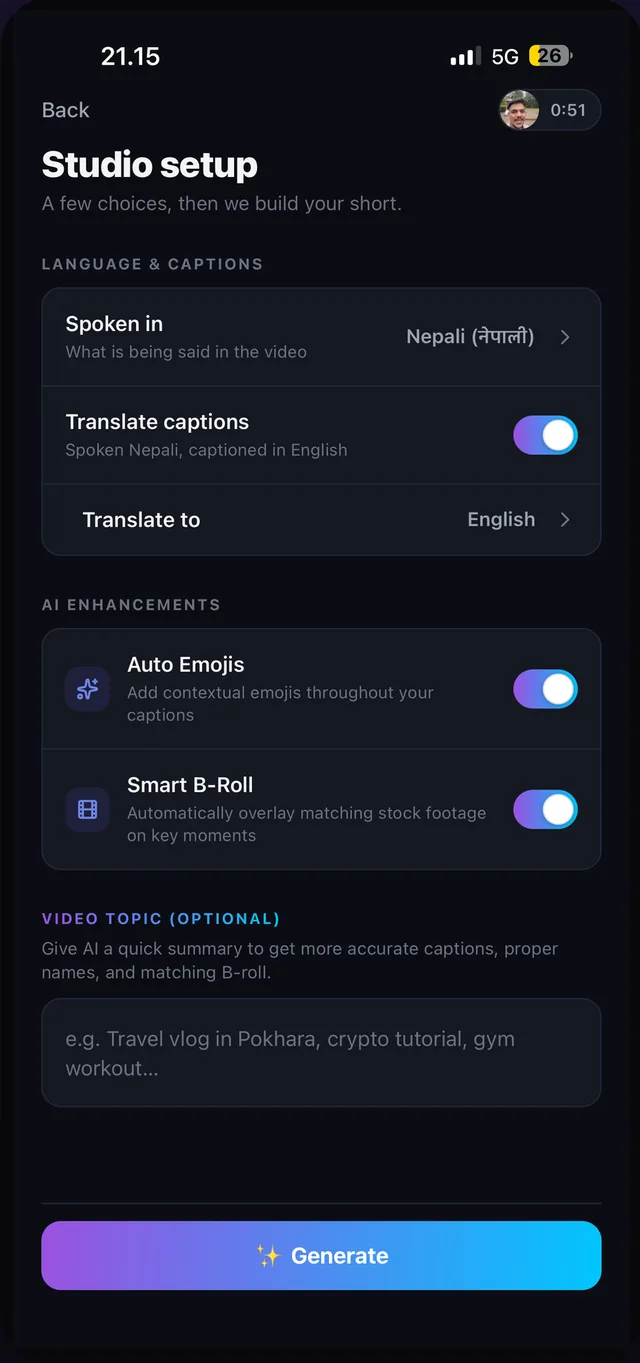
Two settings on the setup screen: the language you speak, and the language your viewers read.
You choose the spoken language from 101. KatKut AI extracts the audio on your phone and transcribes it with a timestamp for every word.
An AI model writes the captions in the caption language you picked, from any of 140. The timing stays your voice's, so each translated line appears while you are saying it.
Machine translation can miss a name or an idiom. Tap any caption in the editor to rewrite it, then export. The translated captions are burned into the video.
Any of the 101 spoken languages can be the source and any of the 140 caption languages the target. A few combinations creators use:
See the full list of 140 languages, including 39 caption-only languages such as Traditional Chinese, Basque, Haitian Creole, Latin and Maithili.
When the caption language is not written in Latin letters, choose whether the captions use its own script or Roman letters. Romanising keeps the words and changes only the letters: for example, नमस्ते or namaste, こんにちは or konnichiwa. This works for captions in the spoken language too, with no translation at all.
Open KatKut AI, tap Select 1 video and choose your video. On the setup screen, set Spoken in to the language you speak, switch on Translate captions and choose the language for the captions. Tap Generate, check the translated lines, and export.
140. Your video can be spoken in any of 101 languages, and the captions can be written in any of 140, including 39 caption-only languages such as Traditional Chinese, Basque, Haitian Creole, Latin and Maithili.
Yes. Tap any caption on the timeline to rewrite it, drag its handles to retime it, or delete it. Every change can be undone, and nothing is rendered until you tap Export.
Yes. Translated captions are drawn into the exported 9:16 video, so they show on TikTok, Instagram, YouTube and anywhere else, including for people watching on mute. KatKut AI does not export a separate subtitle file.
Studio expects one spoken language per video, so choose the language you speak most. If you switch languages for long stretches, the captions may need more editing, which you can do line by line in the editor.
More questions are answered in the Studio FAQ.
Download KatKut AI, pick a video of yourself talking, and choose the language your viewers read.
Requires iOS 16.4 or later on iPhone. Studio needs a free account (Apple or Google sign-in) so your monthly minutes can be tracked.